
The Government e-Marketplace, popularly known as GeM Portal, has transformed the way businesses sell products and services to government departments in India. Introduced by the Government of India, GeM provides a transparent, efficient, and completely online procurement platform for buyers and sellers.
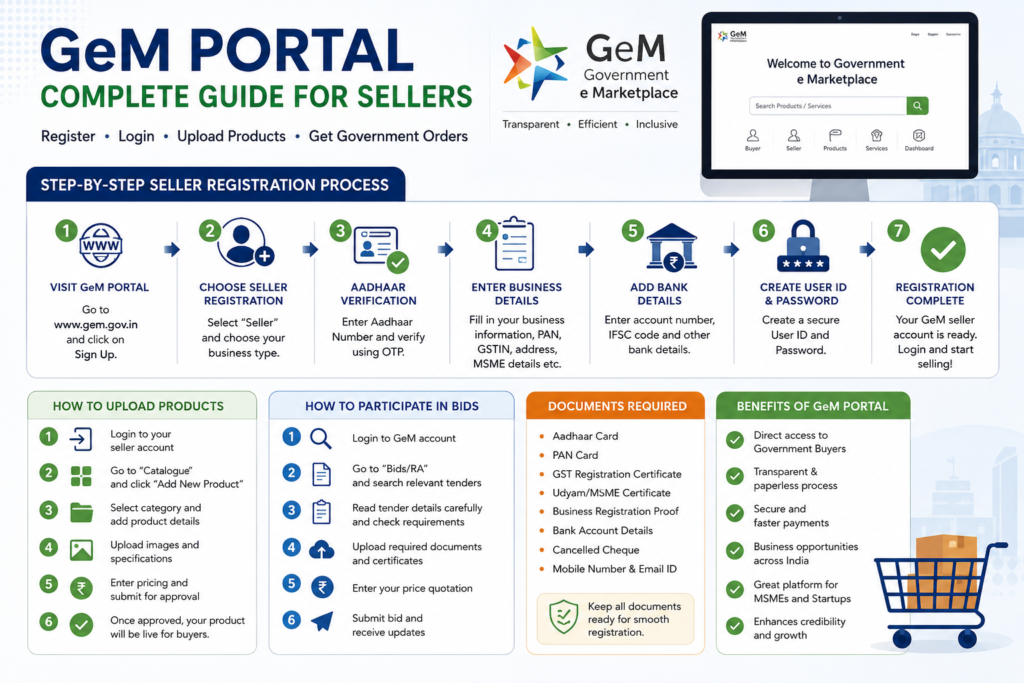
Whether you are a manufacturer, trader, startup, MSME, or service provider, registering on the GeM Portal can open new opportunities to supply products directly to government organizations, schools, hospitals, railways, PSUs, and ministries across India.
In this detailed guide, we will explain everything about GeM Portal registration, login process, seller account setup, required documents, and benefits of joining the GeM ecosystem.
What is GeM Portal?
GeM (Government e-Marketplace) is an online procurement platform launched by the Government of India to simplify the purchasing process for government buyers. It allows registered sellers to list and sell products or services directly to government departments.
The portal ensures:
- Transparency in procurement
- Faster purchasing process
- Digital documentation
- Secure payment system
- Equal opportunity for sellers
Today, thousands of businesses across India are actively using the GeM Portal to grow their sales and expand their market reach.
Who Can Register on GeM Portal?
The following entities can register as sellers on GeM:
- Manufacturers
- Wholesalers
- Traders
- MSMEs
- Startups
- Service providers
- LLPs
- Private Limited Companies
- Proprietorship firms
- Partnership firms
If your business supplies products such as medical items, office supplies, industrial equipment, surgical cotton, machinery, electronics, furniture, or services, GeM can be a valuable platform for growth.
Documents Required for GeM Seller Registration
Before starting registration, keep the following documents ready:
Basic Documents
- Aadhaar Card
- PAN Card
- Mobile Number linked with Aadhaar
- Email ID
Business Documents
- GST Registration Certificate
- Udyam/MSME Certificate
- Business Registration Proof
- Partnership Deed or Incorporation Certificate (if applicable)
Bank Details
- Cancelled Cheque
- Bank Account Number
- IFSC Code
Having these documents prepared in advance helps complete the registration process quickly and smoothly.
Step-by-Step GeM Seller Registration Process
Step 1: Visit the Official GeM Portal
Open the official Government e-Marketplace website in your browser.
On the homepage, click on the “Sign Up” option.
Step 2: Choose Seller Registration
Select the “Seller” option during signup.
You may be asked to choose your business type:
- Manufacturer
- Trader
- Service Provider
Choose the appropriate category based on your business operations.
Step 3: Aadhaar Verification
Enter your Aadhaar number and verify it using the OTP sent to your registered mobile number.
This step is important for identity authentication.
Step 4: Enter Business Information
Fill in all business details carefully, including:
- Business name
- Type of organization
- PAN number
- GSTIN
- Registered office address
- MSME/Udyam details
Ensure all information matches your official documents.
Step 5: Add Bank Account Details
Enter your:
- Bank account number
- IFSC code
- Account holder name
This bank account will be used for receiving payments from government buyers.
Step 6: Create User ID and Password
Create a secure:
- Username
- Password
Use a strong password with uppercase letters, numbers, and symbols for better security.
Step 7: Complete Registration
After submitting all details successfully, your GeM seller account will be created.
You can now log in to the seller dashboard and begin listing products or services.
GeM Portal Login Process
Once registration is complete, logging into the GeM Portal is simple.
Follow These Steps:
- Open the GeM Seller Login page
- Enter your User ID
- Enter Password
- Complete Captcha verification
- Click Login
After successful login, you will access the seller dashboard where you can manage products, bids, orders, invoices, and payments.
How to Upload Products on GeM Portal
Uploading products correctly is very important because it helps attract government buyers.
Product Upload Steps:
- Login to seller dashboard
- Go to “Catalogue”
- Click “Add New Product”
- Select category
- Add product specifications
- Upload clear product images
- Enter pricing details
- Submit for approval
Once approved, your products become visible to government buyers across India.
How to Participate in Government Tenders on GeM
GeM also allows sellers to participate in bids and tenders.
Steps to Apply for Bids:
- Login to GeM account
- Open “Bids/RAs”
- Search relevant tenders
- Read tender requirements carefully
- Upload required documents
- Submit price quotation
- Confirm submission
Winning government tenders can significantly increase business revenue and credibility.
Benefits of Selling on GeM Portal
1. Direct Access to Government Buyers
Businesses can directly supply products to government organizations without middlemen.
2. Transparent System
All processes are digital and transparent, reducing corruption and delays.
3. Nationwide Business Opportunities
Sellers can receive orders from any part of India.
4. Faster Payments
GeM offers secure and streamlined payment processing.
5. MSME Advantages
MSME businesses often receive preference and benefits in government procurement.
6. Increased Brand Credibility
Being listed on a government-approved platform improves business trust and reputation.
Common Problems During GeM Registration
OTP Not Received
Check network connectivity and ensure Aadhaar-linked mobile number is active.
GST Verification Error
Verify GST details carefully before submission.
Login Issues
Use the “Forgot Password” option to reset credentials.
Product Rejection
Ensure product images and specifications are accurate and professional.
Tips for Success on GeM Portal
- Upload high-quality product images
- Keep pricing competitive
- Maintain accurate specifications
- Respond quickly to buyer inquiries
- Participate regularly in bids and tenders
- Update stock and catalogue frequently
Consistency and professionalism can help sellers secure long-term government business opportunities.
Conclusion
The GeM Portal has become one of the most important digital marketplaces for businesses in India. From MSMEs and startups to manufacturers and service providers, the platform offers a powerful opportunity to connect with government buyers in a transparent and efficient way.
By completing proper registration, maintaining an updated catalogue, and actively participating in bids, businesses can expand their reach, increase sales, and build strong credibility in the government procurement sector.
If you are planning to grow your business through government supply contracts, registering on the GeM Portal is a smart and valuable step toward long-term success.
if you find article useful then kindly visit more articles here







Leave a Reply